
On this page
If you're still relying on legacy learning systems, you're already feeling the friction. Training takes longer to roll out. Software updates demand IT support. Learners struggle with outdated interfaces. Reporting is slow. As workforces become more distributed and skills evolve faster, these limitations make it harder to deliver effective learning at scale.
A cloud-based LMS (Learning Management System) is an online training platform hosted on vendor-managed servers and accessed through a web browser or mobile app. It delivers learning without the need for on-premise infrastructure, IT maintenance, or manual software updates.
Unlike traditional systems that require local installation and ongoing maintenance, a cloud-based LMS is always available, automatically updated, and accessible from anywhere. Whether you're onboarding new employees, delivering compliance training, or building workforce skills, cloud LMS platforms help you launch learning programs faster while reducing the burden on your IT team.
Today, organizations of every size are moving to cloud-based learning platforms because they are easier to deploy, simpler to manage, and more scalable than legacy on-premise systems. They also integrate with modern HR systems, support mobile learning, and provide real-time insights into learner progress and business outcomes.
Here we'll compare the best cloud-based LMS platforms available in 2026, explain how a cloud-based learning management system works, explore its key benefits and use cases, and provide a practical framework for choosing the right platform for your organization.
TL;DR: Best Cloud-Based LMS Platforms
- Best overall: Disprz – An AI-powered cloud-based LMS combining LMS, LXP, skills intelligence, and mobile-first learning for enterprise workforces.
- Best for enterprises: Cornerstone Learning – Ideal for large global organizations requiring advanced talent management, compliance, and workforce development.
- Best for frontline teams: Disprz – Purpose-built for deskless and distributed workforces with offline learning, multilingual support, and AI-powered personalized learning.
- Best for compliance training: Absorb LMS – Strong automation, certification tracking, audit trails, and reporting for highly regulated industries.
- Best for SMBs: TalentLMS – Easy to deploy, affordable, and well suited for small and growing businesses with limited IT resources.
Whether you're replacing an on-premise LMS or evaluating your first cloud-based learning management system, the right platform depends on your workforce, business goals, compliance requirements, and integration needs.
What Is a Cloud-Based LMS?
Cloud-Based LMS Definition
A cloud-based LMS is an online training platform hosted on vendor-managed servers. Employees access learning through a web browser or mobile app, while the vendor takes care of infrastructure, software updates, security, and system maintenance.
A cloud-based LMS is a learning platform managed by the vendor and accessed online through a web browser or mobile app. An on-premise LMS is installed on your organization's own servers and maintained by your internal IT team. Today, most organizations prefer cloud-based LMS systems because they are easier to deploy, maintain, and scale.
A cloud-based learning management system (LMS) helps organizations create, deliver, manage, and track employee training over the internet. Instead of installing the platform on local servers, the LMS is hosted by the vendor, allowing learners and administrators to access it anytime through a browser or mobile application.
Unlike a traditional on-premise LMS, a cloud-hosted LMS doesn't require organizations to manage servers, install software updates, or maintain infrastructure. The vendor handles hosting, security, backups, and regular updates, while your L&D team focuses on delivering engaging learning experiences.
Key Characteristics of a Cloud-Based LMS
Most cloud LMS solutions share three core characteristics:
- Hosted on vendor-managed servers: The provider manages the infrastructure, software updates, security patches, and system availability, eliminating the need for in-house server management.
- Accessible through browsers and mobile apps: Learners can access courses, assessments, and certifications from virtually anywhere using desktops, tablets, or smartphones.
- Subscription-based pricing: Most cloud LMS software follows a monthly or annual subscription model, making it easier to scale users without large upfront infrastructure investments.
How Does a Cloud-Based LMS Work?
A cloud-based learning platform simplifies learning delivery by moving the entire training ecosystem online.
Here's how it typically works:
- Your organization subscribes to a cloud-based LMS.
- Administrators upload or create learning content such as courses, videos, assessments, and learning paths.
- Employees receive training assignments through the web portal or mobile app.
- Learners complete training from any location, with progress automatically tracked in real time.
- Managers and L&D teams monitor completions, certifications, skills, and learning analytics through built-in dashboards.
Because the vendor manages the technology behind the platform, your organization always benefits from the latest features, performance improvements, and security updates without additional IT effort. This makes a cloud-based learning management system faster to deploy, easier to manage, and more cost-effective than many traditional on-premise LMS deployments.
4 Types of Cloud-Based LMS: Which Model Fits Your Organization?
Not all cloud-based LMS systems are built the same. While every cloud-based learning management system is delivered online, the level of vendor management, customisation, and IT involvement can vary significantly.
The right model depends on your organization's size, technical resources, compliance requirements, and workforce. The table below provides a quick comparison.
| Type | Hosting | IT Dependency | Best For |
|---|---|---|---|
| Proprietary (Vendor-Hosted) | Vendor-managed | Low | Fast deployment, reliability, and minimal IT effort |
| Open-Source Cloud | Vendor or self-managed | High | Deep customisation for organizations with strong technical teams |
| Fully Hosted | Vendor-managed end-to-end | Very Low | Enterprise-scale deployment with minimal administration |
| Mobile-First | Vendor-managed | Low | Frontline, deskless, and distributed workforces |
1. Proprietary (Vendor-Hosted) Cloud LMS
A proprietary cloud LMS is developed, hosted, and maintained by the software vendor. Your organization subscribes to the platform and accesses it through a browser or mobile app, while the vendor manages updates, security, infrastructure, and new feature releases.
Key characteristics:
- No servers or infrastructure to maintain.
- Automatic software updates and security patches.
- Vendor-managed hosting and technical support.
- Subscription-based pricing with predictable costs.
- Fast implementation and easy scalability.
Best for: Organizations that want a reliable hosted LMS with minimal IT involvement and faster time-to-value.
2. Open-Source Cloud LMS
An open-source cloud-based LMS gives organizations access to the platform's source code, allowing extensive customisation. While the system may still be hosted in the cloud, your organization typically manages configuration, upgrades, integrations, and ongoing maintenance.
Key characteristics:
- Highly customisable platform.
- Greater flexibility for unique workflows.
- Requires technical expertise for implementation and maintenance.
- Higher responsibility for upgrades and security.
- Suitable for organizations with dedicated IT teams.
Best for: Organizations that prioritise deep customisation and have the technical resources to manage the platform.
3. Fully Hosted Cloud LMS
A fully hosted cloud-based learning platform provides an end-to-end managed experience. The vendor handles hosting, maintenance, backups, monitoring, security, and software updates, allowing L&D teams to focus entirely on learning programmes.
Key characteristics:
- Complete vendor-managed infrastructure.
- Minimal administrative overhead.
- High availability and scalability.
- Faster deployment than self-managed alternatives.
- Built-in security, backups, and disaster recovery.
Best for: Large organizations that want enterprise-scale learning without increasing IT workload.
4. Mobile-First Cloud LMS
A mobile-first cloud-hosted LMS is designed primarily for employees who spend most of their time away from a desk, such as retail associates, field sales teams, manufacturing workers, logistics staff, and service technicians.
These platforms prioritise smartphone learning, offline access, microlearning, push notifications, and quick assessments to improve engagement among distributed workforces.
Key characteristics:
- Optimised mobile experience.
- Offline learning and automatic sync.
- Microlearning and bite-sized content.
- Push notifications and learning reminders.
- Supports geographically distributed teams.
Best for: Frontline, field, and deskless workforces that need learning anytime, anywhere, even in low-connectivity environments.
Cloud-Based LMS vs On-Premise vs Self-Hosted: Full Comparison
Choosing between a cloud-based LMS, an on-premise LMS, and a self-hosted solution affects much more than deployment. It impacts implementation speed, IT workload, security, scalability, long-term costs, and your ability to support a growing workforce.
The table below highlights the key differences.
| Feature | Cloud-Based LMS | On-Premise / Self-Hosted LMS |
|---|---|---|
| Deployment | Hosted and managed by the vendor | Installed and managed on your own servers |
| Setup Time | Days or weeks | Weeks or months |
| Infrastructure | Vendor provides and maintains infrastructure | Organization purchases and maintains servers |
| Software Updates | Automatic and included | Manual updates handled by internal IT |
| Scalability | Easily scales as your workforce grows | Requires additional infrastructure and planning |
| IT Dependency | Low | High |
| Upfront Cost | Lower, subscription-based | Higher due to hardware, licensing, and implementation |
| Remote Access | Available through any browser or mobile app | Depends on your infrastructure and network configuration |
| Security & Compliance | Vendor-managed certifications such as SOC 2, ISO, and GDPR compliance | Managed internally by your IT and security teams |
| Data Ownership | Your organization owns the data while the vendor securely hosts it | Your organization owns and hosts the data internally |
Most enterprises with distributed workforces, rapid growth, or limited IT capacity choose a cloud-based LMS. On-premise deployments are increasingly rare outside highly regulated industries with strict data localisation requirements.
What This Means for Your Organization
The right deployment model depends on your business priorities.
Choose a cloud-based learning management system if you:
- Need faster implementation with minimal IT involvement.
- Have employees working across multiple locations or countries.
- Need automatic updates and continuous feature improvements.
- Prefer predictable subscription pricing instead of large infrastructure investments.
- Expect your learning programmes to scale as your organization grows.
An on-premise LMS may still be suitable if you:
- Must comply with strict internal hosting or data residency requirements.
- Already maintain a large internal IT infrastructure.
- Need complete control over infrastructure and system configuration.
- Have highly specialised security or compliance requirements that cannot be met through vendor-managed hosting.
For most modern organizations, the advantages of a cloud LMS (including lower maintenance, faster deployment, stronger scalability, and easier remote access) far outweigh the additional control offered by on-premise systems. Unless regulatory requirements dictate otherwise, a cloud-based learning platform is typically the more future-ready choice.
Best Cloud-Based LMS Platforms in 2026
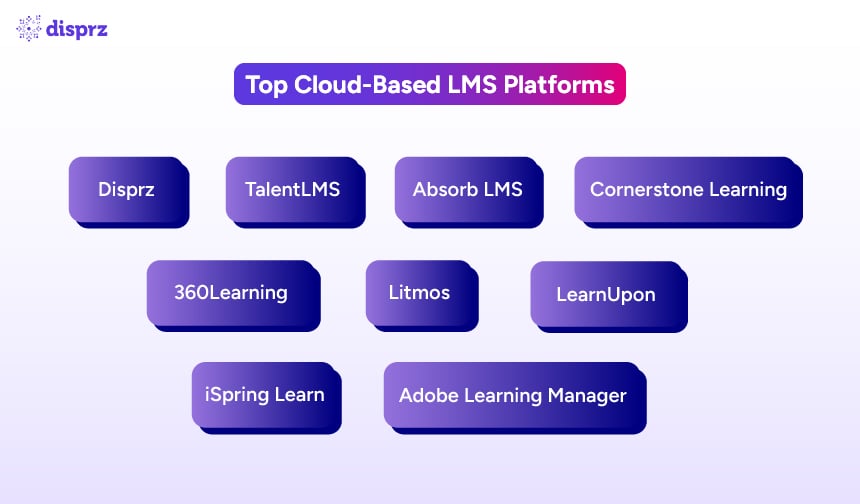
With hundreds of cloud LMS solutions available today, choosing the right platform can be overwhelming. The best cloud-based LMS for your organization depends on your workforce, learning strategy, compliance requirements, and integration needs.
The platforms below are evaluated across five key criteria: AI-powered personalization, mobile and offline learning, compliance and reporting, HRMS integrations, and scalability for distributed teams.
Top Cloud-Based LMS in 2026: Quick Comparison
If you need a quick summary before diving into the details, this is for you:
| Platform | Best For | AI Personalization | Mobile / Offline | G2 Rating |
|---|---|---|---|---|
| Disprz | Frontline & enterprise teams | Advanced | Mobile | 4.5 / 5 (81 reviews) |
| 360Learning | Collaborative learning | Good | Mobile | 4.6 / 5 (618 reviews) |
| LearnUpon | Multi-portal training | Basic | Mobile | 4.5 / 5 (254 reviews) |
| Absorb LMS | Compliance automation | Good | Mobile | 4.6 / 5 (950 reviews) |
| Litmos | Fast deployment | Basic | Mobile | 4.3 / 5 (698 reviews) |
| Cornerstone Learning | Global enterprises | Advanced | Mobile | 4.1 / 5 (530 reviews) |
| TalentLMS | SMBs | Basic | Mobile | 4.6 / 5 (805 reviews) |
| iSpring Learn | Rapid employee training | Basic | Mobile | 4.6 / 5 (165 reviews) |
| Adobe Learning Manager | Customer & partner training | Advanced | Mobile | 4.0 / 5 (318 reviews) |
Now let's see them in detail.
1. Disprz – Best for Frontline and Enterprise Teams in APAC and MEA
Disprz is an AI-powered cloud-based learning management system that combines an LMS, LXP, skills intelligence, AI content authoring, and performance enablement into a single platform. It is designed for organizations with large frontline and distributed workforces that need personalized learning, measurable business outcomes, and enterprise-grade scalability.
Unlike many traditional cloud LMS software platforms that primarily focus on course administration, Disprz connects learning with skills, performance, and business KPIs. The platform is widely used by organizations across banking, financial services, insurance, retail, manufacturing, telecommunications, healthcare, logistics, hospitality, aviation, and energy.
Best For
- Large enterprises across India, the Middle East, and Southeast Asia.
- Frontline, deskless, and distributed workforces.
- Organizations adopting skills-based learning.
- Businesses looking for a unified LMS + LXP platform.
- Organizations seeking measurable learning impact instead of completion metrics alone.
Key Features
AI-Powered Skills Intelligence
Disprz automatically identifies skill gaps, recommends personalized learning journeys, and aligns development with job roles and organizational goals.
Mobile-First Learning with Offline Access
The platform is built for employees who work outside traditional office environments. Learners can download courses, complete training offline, and automatically sync their progress once connectivity is restored.
Enterprise Integrations
Disprz integrates with leading enterprise systems including Workday, SAP SuccessFactors, Oracle, Microsoft Teams, WhatsApp, HRIS platforms, and Single Sign-On providers.
Advanced Learning Analytics
Real-time dashboards help L&D teams measure learner engagement, skill progression, completion rates, manager effectiveness, and business impact instead of tracking course completion alone.
Unified Learning Experience
Unlike standalone cloud-based LMS systems, Disprz combines mandatory learning, self-directed learning, AI-powered recommendations, skills intelligence, assessments, coaching, and performance support within one platform.
ROSHN, a major Saudi developer, ran its workforce skilling program on Disprz's cloud-based platform and attributed 15% annual business growth to it, alongside 91% platform adoption and a 50% reduction in manual L&D work.
Limitations
- Organizations primarily operating in North America may require deeper out-of-the-box compliance content for regulations such as FINRA or SEC.
- Some advanced AI capabilities may require configuration based on organizational learning goals.
Pricing
Custom pricing based on organization size, workforce requirements, implementation scope, and selected modules.
G2 Rating
4.5 / 5 (81 reviews)
2. 360Learning – Best for Collaborative Learning
360Learning is a cloud-based LMS built around collaborative learning. Instead of relying solely on L&D teams to create training, it enables subject matter experts (SMEs) to build, review, and publish courses quickly. This approach helps organizations capture internal knowledge and keep learning content up to date.
The platform combines course authoring, learner engagement, analytics, and AI-assisted content creation. It is particularly well suited for organizations that value peer learning and knowledge sharing.
Best For
- Mid-market and enterprise organizations.
- Organizations with strong internal subject matter experts.
- Organizations promoting collaborative and social learning.
- Teams looking to create learning content quickly without relying entirely on instructional designers.
Key Features
Collaborative Course Authoring
Subject matter experts can co-create courses, gather feedback, and publish content without requiring advanced instructional design skills.
Social Learning
Discussion boards, comments, peer reviews, reactions, and knowledge sharing help learners collaborate throughout the learning journey.
AI-Assisted Content Creation
AI helps speed up course creation by generating quizzes, summaries, and learning materials, reducing content development time.
Integration Ecosystem
The platform integrates with HR systems, collaboration tools, and content providers to streamline learning administration.
Learning Analytics
Managers can monitor learner engagement, course completion, knowledge retention, and collaboration metrics through built-in dashboards.
Limitations
- Mobile and offline learning capabilities are not as comprehensive as platforms designed specifically for frontline and deskless employees.
- Skills intelligence and AI-driven learning personalization are less advanced than some enterprise-focused platforms.
Pricing
Starts at $8 per registered user per month (custom enterprise pricing available).
G2 Rating
4.6 / 5 (618 reviews)
3. LearnUpon – Best for Multi-Portal Enterprise Training
LearnUpon is a cloud-based LMS designed for organizations that need to train multiple audiences from a single platform. Its multi-portal architecture allows organizations to deliver separate learning experiences for employees, customers, partners, and franchisees while managing everything from one central system.
The platform is known for its intuitive interface, reliable automation, and strong certification management. It works well for organizations that want to scale training across different user groups without creating separate learning environments.
Best For
- Enterprises delivering training to employees, customers, partners, or distributors.
- Organizations managing multiple business units or brands.
- Organizations requiring separate learning portals with centralized administration.
- Businesses looking for a scalable cloud-based learning management system with minimal administrative complexity.
Key Features
Multi-Portal Architecture
Create and manage multiple branded learning portals from a single admin dashboard. Each portal can have its own users, courses, branding, and reporting while remaining centrally managed.
Certification and Compliance Tracking
Automate certifications, recertification reminders, and course enrolments to help learners stay compliant with mandatory training requirements.
Learning Automation
Reduce manual administration by automating enrolments, notifications, reminders, learning paths, and reporting workflows.
Integrations
LearnUpon integrates with popular HRIS platforms, CRM systems, webinar tools, content libraries, and Single Sign-On providers, making it easy to fit into an existing technology ecosystem.
Reporting and Analytics
Track learner progress, course completion, certifications, engagement, and assessment results through configurable dashboards and reports.
Limitations
- AI-powered personalization and skills intelligence are less advanced than platforms such as Disprz or Docebo.
- Content authoring capabilities are more limited than platforms focused on collaborative course creation.
Pricing
Custom pricing based on the number of active users and organizational requirements.
G2 Rating
4.5 / 5 (254 reviews)
4. Absorb LMS – Best for Compliance Automation
Absorb LMS is a cloud-based learning management system built for organizations that need to automate compliance training while delivering a modern learner experience. It combines powerful learning administration with advanced reporting, making it a popular choice for highly regulated industries.
The platform helps L&D teams reduce manual work by automating enrolments, certifications, recertification reminders, and compliance reporting. Its strong analytics and audit-ready records make it well suited for organizations with strict regulatory requirements.
Best For
- Healthcare organizations.
- Financial services and banking.
- Pharmaceutical and life sciences companies.
- Enterprises with complex compliance and certification requirements.
Key Features
Automated Compliance Training
Automatically assign courses based on employee roles, departments, locations, or hire dates. The platform also manages recertification schedules and renewal reminders to help organizations stay compliant.
Advanced Reporting and Audit Trails
Generate detailed reports on learner progress, certifications, assessment results, and compliance status. Immutable audit logs simplify internal and external audits.
Enterprise Security
Absorb LMS supports enterprise-grade security and compliance standards, including SOC 2 Type II certification, helping organizations meet stringent security expectations.
AI-Powered Learning Experience
The platform uses AI to recommend relevant content, improve search, and personalise learning experiences based on learner behaviour.
Integrations
Absorb integrates with leading HRIS platforms, CRM systems, content libraries, webinar tools, and Single Sign-On providers, allowing organizations to streamline user management and reporting.
Limitations
- The administrator interface can require a learning curve for new users.
- The learner experience, while modern, is less intuitive than some newer AI-first learning platforms.
- Advanced functionality and integrations may increase implementation complexity for smaller organizations.
Pricing
Custom pricing based on organizational requirements and number of users.
G2 Rating
4.6 / 5 (950 reviews)
5. Litmos – Best for Fast Deployment in Mid-Market Organizations
Litmos is a cloud-based LMS designed for organizations that want to launch training quickly without lengthy implementation projects. It combines course management, compliance training, reporting, and mobile learning in an easy-to-use platform, making it a popular choice for mid-sized businesses.
One of Litmos' biggest strengths is its extensive library of pre-built compliance courses and rapid deployment. Organizations can roll out employee training in days rather than weeks, reducing the time required to onboard learners and meet regulatory requirements.
Best For
- Mid-sized businesses seeking a quick LMS implementation.
- Organizations delivering compliance and workplace safety training.
- Organizations with distributed or hybrid workforces.
- Businesses looking for an easy-to-manage cloud-based training platform.
Key Features
Rapid Deployment
Litmos is designed for fast implementation, allowing organizations to launch learning programmes within days instead of months. Its intuitive interface also reduces administrator training time.
Extensive Compliance Content Library
The platform offers access to ready-made compliance training covering topics such as GDPR, anti-money laundering (AML), OSHA, workplace harassment, cybersecurity, and other regulatory requirements, helping organizations accelerate compliance programmes.
Mobile Learning
Employees can access training through web browsers or the Litmos mobile app, enabling learning on the go. Offline access allows learners to continue training even without an internet connection.
Automation and Reporting
Administrators can automate learner enrolments, certification renewals, notifications, and recurring training assignments while tracking progress through configurable dashboards and reports.
Enterprise Integrations
Litmos integrates with HRIS platforms, CRM systems, content providers, virtual meeting tools, and Single Sign-On solutions, making it easy to connect with existing business systems.
Limitations
- AI-powered personalization and skills intelligence are less advanced than newer AI-first platforms.
- Organizations seeking integrated skills management or career development capabilities may require additional solutions beyond the LMS.
Pricing
Starts at approximately $3 per user per month (enterprise pricing varies based on deployment and feature requirements).
G2 Rating
4.3 / 5 (698 reviews)
6. Cornerstone Learning – Best for Large Global Enterprises
Cornerstone Learning is an enterprise-grade cloud-based learning management system designed for organizations managing learning at a global scale. As part of the broader Cornerstone Talent Experience Platform, it combines learning, skills development, compliance, and workforce growth into a single ecosystem.
The platform is well suited for multinational organizations that need advanced learning administration, extensive localisation, robust compliance capabilities, and seamless integration with talent management processes.
Best For
- Large multinational enterprises.
- Organizations with complex compliance and governance requirements.
- Organizations managing learning across multiple countries and languages.
- Businesses seeking an integrated learning and talent management platform.
Key Features
AI-Powered Learning and Skills Development
Cornerstone uses AI to recommend personalized learning, identify skill gaps, and support internal career mobility by matching employees with relevant learning opportunities.
Global Learning Management
The platform supports multiple languages, regional compliance requirements, and localised learning experiences, making it suitable for organizations operating across diverse markets.
Compliance and Certification Management
Administrators can automate mandatory training, certifications, recertification cycles, and compliance reporting while maintaining detailed audit records.
Enterprise Integrations
Cornerstone integrates with major HR systems, including Workday, SAP SuccessFactors, Oracle HCM, Microsoft Azure AD, and numerous enterprise applications.
Advanced Analytics
Comprehensive dashboards provide insights into learner engagement, compliance status, skill development, training effectiveness, and workforce readiness.
Limitations
- Implementation can be lengthy due to the platform's extensive functionality.
- The wide range of features may be more than smaller organizations require.
- Pricing is generally higher than many mid-market cloud LMS solutions.
Pricing
Custom enterprise pricing based on organization size, deployment scope, and selected modules.
G2 Rating
4.1 / 5 (530 reviews)
7. TalentLMS – Best for Small and Medium-Sized Businesses (SMBs)
TalentLMS is a cloud-based LMS built for organizations that want a simple, affordable, and easy-to-manage learning platform. It offers the core capabilities needed to deliver employee training without the complexity of large enterprise systems, making it a popular choice for growing businesses.
The platform supports course creation, compliance training, assessments, certifications, and reporting through an intuitive interface. Its quick setup and transparent pricing make it ideal for organizations with limited IT resources or L&D teams.
Best For
- Small and medium-sized businesses (SMBs).
- Startups and fast-growing companies.
- Organizations launching their first learning platform.
- Businesses looking for an affordable cloud-based learning management system.
Key Features
Quick and Easy Deployment
TalentLMS can be configured in a matter of hours, allowing organizations to start delivering training without lengthy implementation projects.
Course Creation and Content Support
Administrators can build courses using videos, presentations, SCORM, xAPI, quizzes, and assessments. The platform also supports instructor-led and virtual training sessions.
Certification and Compliance
Automate course assignments, certification renewals, and completion tracking to simplify compliance training and mandatory learning programmes.
Mobile Learning
Learners can access training through web browsers or the TalentLMS mobile app, enabling learning anytime and anywhere.
Reporting and Integrations
The platform provides learner progress reports, completion analytics, and integrations with HR systems, conferencing tools, and Single Sign-On providers.
Limitations
- AI-powered personalization and skills intelligence are relatively limited compared to enterprise-focused platforms such as Disprz or Cornerstone.
- Advanced workflow automation and large-scale enterprise capabilities may not meet the needs of complex global organizations.
Pricing
Free plan available for small teams, with paid plans starting from approximately $149 per month (pricing varies based on users and features).
G2 Rating
4.6 / 5 (805 reviews)
8. iSpring Learn – Best for Rapid Employee Training and Ease of Use
iSpring Learn is a cloud-based LMS designed for organizations that want to launch employee training quickly without a steep learning curve. Its intuitive interface, built-in authoring capabilities, and straightforward administration make it a strong choice for businesses that need an LMS that's easy to implement and manage.
The platform is particularly popular among organizations delivering onboarding, compliance, product knowledge, and sales training. When paired with iSpring Suite, it also enables teams to create interactive e-learning content without requiring specialist instructional design skills.
Best For
- Small and mid-sized businesses.
- Organizations looking for quick LMS implementation.
- HR and L&D teams with limited technical expertise.
- Organizations delivering onboarding, compliance, and product training.
Key Features
Intuitive User Experience
iSpring Learn offers a clean, easy-to-navigate interface for both administrators and learners, reducing the time needed for platform adoption and training.
Built-In Course Authoring
When used with iSpring Suite, administrators can quickly create interactive courses, quizzes, video tutorials, and assessments directly from PowerPoint, making content development significantly faster.
Mobile Learning
Learners can access training through desktop browsers or the iSpring Learn mobile app. Offline learning ensures employees can complete courses without a continuous internet connection.
Certification and Automation
The platform automates enrolments, reminders, certification renewals, and recurring training assignments, helping organizations manage compliance with minimal manual effort.
Reporting and Integrations
Managers can monitor learner progress, assessment scores, and course completion through detailed reports. iSpring Learn also integrates with HR systems, content standards such as SCORM and xAPI, and Single Sign-On providers.
Limitations
- AI-powered personalization and skills intelligence are more limited than platforms such as Disprz, Cornerstone Learning, or Docebo.
- Large enterprises with complex global training requirements may find advanced workflow automation and scalability less comprehensive than enterprise-focused platforms.
Pricing
Paid plans start at approximately $3.70 per user per month (billed annually), with enterprise pricing available for larger deployments.
G2 Rating
4.6 / 5 (165 reviews)
9. Adobe Learning Manager – Best for Customer, Partner, and Extended Enterprise Training
Adobe Learning Manager is a cloud-based learning management system designed for organizations that deliver training beyond their employees. It enables businesses to create personalized learning experiences for customers, partners, franchisees, sales channels, and employees from a single platform.
The platform leverages Adobe's AI capabilities to recommend learning content, automate skill development, and provide detailed analytics. Its scalability and extensive integration ecosystem make it a strong choice for organizations managing large, diverse learner audiences.
Best For
- Organizations delivering customer education and partner training.
- Global enterprises with multiple learner groups.
- Businesses looking for AI-driven learning recommendations.
- Organizations that already use Adobe Experience Cloud or other Adobe products.
Key Features
AI-Powered Personalized Learning
Adobe Learning Manager uses AI to recommend relevant courses, learning paths, and content based on learner roles, interests, and previous learning activity.
Extended Enterprise Training
The platform allows organizations to train employees, customers, channel partners, distributors, and franchise networks from one centralized system while maintaining separate learning experiences for each audience.
Headless Learning and Integrations
Adobe supports headless learning, allowing organizations to embed learning directly into websites, customer portals, mobile apps, or business applications. It also integrates with leading HR systems, CRM platforms, Adobe Experience Cloud, and Single Sign-On providers.
Skills and Compliance Management
Administrators can automate certifications, compliance programmes, and role-based learning while tracking learner progress through configurable dashboards and reports.
Enterprise Analytics
Comprehensive reporting provides insights into learner engagement, content effectiveness, certification status, and learning outcomes, helping organizations continuously improve training programmes.
Limitations
- The platform is better suited to mid-sized and large enterprises than small businesses.
- Advanced functionality and integrations can increase implementation complexity.
- Organizations looking primarily for frontline learning or offline mobile capabilities may find purpose-built platforms such as Disprz better aligned with those requirements.
Pricing
Custom pricing based on the number of learners, deployment requirements, and selected features.
G2 Rating
4.0 / 5 (318 reviews)
7 Key Benefits of a Cloud-Based LMS [With Examples]
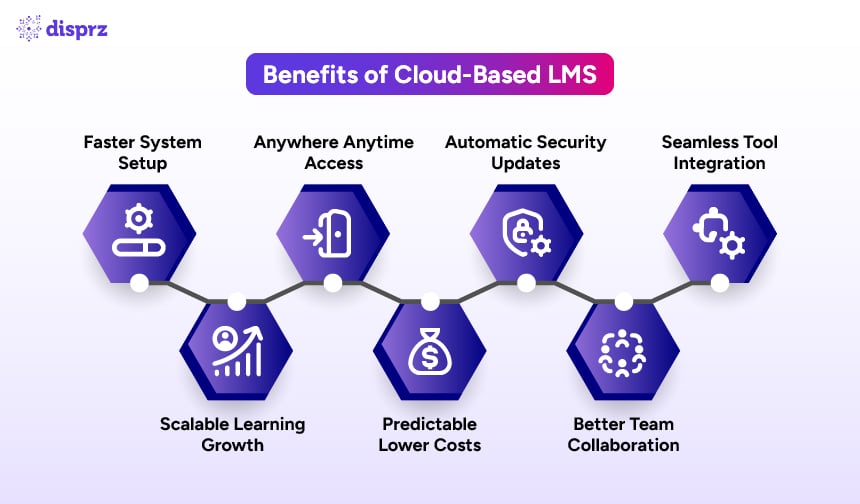
When you adopt a cloud-based LMS, you're not just switching platforms; you're transforming how learning is delivered, managed, and measured across your organization. From faster implementation to AI-powered analytics, the benefits of a cloud-based learning management system help L&D teams deliver better learning experiences with less administrative effort.
Here are the seven biggest cloud-based LMS benefits organizations can expect.
1. Faster Setup and Lower IT Dependency
With a cloud LMS, there's no infrastructure to provision or software to install. Your platform can be deployed in days rather than months. The vendor manages hosting, updates, and performance, allowing your IT teams to focus on strategic initiatives instead of system maintenance.
Example: A retail organization rolling out onboarding across 500 stores can launch learning significantly faster with a cloud-hosted LMS than with an on-premise LMS, helping employees become productive sooner.
2. Scalability for Growing Learner Needs
Whether you're onboarding 50 employees or 50,000, cloud-based LMS systems scale effortlessly. You can add users, regions, languages, and learning content without worrying about server capacity or downtime, making cloud LMS solutions ideal for growing organizations.
Example: An organization expanding into new countries can onboard thousands of new employees without investing in additional IT infrastructure.
3. Anytime, Anywhere Access
A cloud-based learning platform enables learners to access training from any device, anywhere in the world. This flexibility supports remote employees, frontline workers, field teams, and hybrid workforces while improving participation and course completion.
Example: Mobile-first learning enables sales representatives and field technicians to complete training during downtime, helping organizations improve learning completion and reduce time away from work.
4. Predictable and Cost-Efficient Pricing
Most hosted LMS platforms follow a subscription-based pricing model, helping organizations avoid significant upfront infrastructure investments. You pay for the users and features you need, making budgeting easier and reducing the total cost of ownership.
Example: Instead of purchasing servers and software licences, organizations can invest more of their learning budget in creating high-quality content and developing employee skills.
5. Automatic Updates and Security Patches
Your cloud-based learning management system evolves continuously. New features, performance improvements, bug fixes, and security updates are delivered automatically, ensuring every user always has access to the latest version without manual upgrades.
Example: L&D teams gain immediate access to new AI capabilities, reporting enhancements, and security improvements without scheduling maintenance windows or disrupting employee learning.
6. Better Collaboration and Engagement
Modern cloud-based training platforms go beyond course delivery by supporting social learning, discussions, leaderboards, badges, gamification, and peer collaboration. These capabilities make learning more interactive, encourage knowledge sharing, and improve learner engagement.
For organizations looking to increase participation and knowledge retention, gamification can significantly enhance the learning experience.
7. Easy Integration with Enterprise Tools
A cloud LMS integrates seamlessly with HR systems, collaboration platforms, identity providers, and productivity tools. This enables organizations to automate user provisioning, synchronise learner data, simplify reporting, and build a connected digital learning ecosystem.
Example: Integrating your LMS with platforms such as Workday, SAP SuccessFactors, Microsoft Teams, or Oracle HCM reduces manual administration while providing a consistent learner experience across enterprise systems.
Cloud-Based LMS Use Cases: 4 High-Impact Applications
A cloud-based LMS adapts to multiple learning scenarios, making it the foundation of modern enterprise learning. Whether you're building workforce capabilities, ensuring compliance, or educating external audiences, a cloud-based learning platform provides the flexibility to deliver training at scale.
Here are four of the most common ways organizations use cloud-based learning management systems today.
1. Corporate Training and Compliance
A cloud LMS enables you to centralise mandatory training, certifications, and policy updates in one platform. Automated enrolments, reminders, progress tracking, and reporting make it easier to meet regulatory requirements while reducing administrative effort. For regulated industries, cloud-based LMS systems also provide audit-ready records and consistent learning experiences across locations.
Business impact: Organizations can significantly reduce the manual effort required to manage compliance training while improving course completion rates and audit readiness.
2. Employee Onboarding
With a cloud-based learning management system, onboarding can begin before an employee's first day. You can create structured learning paths, role-based training, and personalized welcome journeys that help new hires become productive faster, regardless of where they're located. This ensures a consistent onboarding experience across teams, offices, and regions.
Business impact: A structured employee onboarding system helps reduce time-to-productivity while ensuring every new hire receives the same high-quality learning experience.
3. Continuous Upskilling and Reskilling
As business priorities and skill requirements evolve, continuous learning becomes essential. A cloud-based learning platform supports ongoing development through microlearning, AI-powered recommendations, personalized learning paths, and skills-based development programmes. This helps organizations continuously upskill and reskill employees to meet changing business needs.
Business impact: Continuous upskilling & reskilling enables organizations to close skill gaps faster and build a workforce that's better prepared for new technologies, products, and business challenges.
4. Partner, Customer, and Extended Enterprise Training
Many organizations use cloud LMS solutions to train more than just employees. Partners, distributors, franchisees, and customers can all access learning through the same hosted LMS, while receiving tailored content, certifications, and branded learning experiences. This approach improves product knowledge, supports customer success, and strengthens partner enablement.
Business impact: A single learning platform helps organizations deliver consistent training across their entire ecosystem while reducing the complexity of managing multiple training solutions.
6 Must-Have Features of a Cloud-Based LMS in 2026
By 2026, a cloud-based LMS is expected to do far more than host courses. It should help you understand workforce skills, personalise learning journeys, automate administration, and connect learning directly to business outcomes. When evaluating cloud-based LMS systems, focus on capabilities that support continuous learning; not just content delivery.
Here are the six features that matter most.
1. AI-Driven Personalization
Modern cloud LMS solutions use AI to recommend learning content based on employee roles, skills, career goals, and learning behaviour. Instead of assigning identical courses to everyone, you can create personalized learning paths that evolve with each learner.
This improves learner engagement while reducing the manual effort required to assign and manage training programmes.
2. Skills Mapping and Progress Tracking
A strong cloud-based learning platform helps you identify skill gaps, map competencies, and monitor development over time. Rather than measuring success through course completions alone, you can track actual capability growth across individuals, teams, and business functions.
This allows L&D teams to align learning investments with organizational priorities and future workforce needs.
3. Learning Analytics and Reporting
Your cloud-based learning management system should provide actionable insights, not just dashboards. Look for advanced reporting that measures learner engagement, skill development, certification status, and programme effectiveness.
These insights help L&D leaders optimize learning strategies, demonstrate ROI, and make better data-driven decisions.
4. Mobile-First Design with Offline Learning
Learning shouldn't stop when internet connectivity does. Leading cloud-based training platforms support mobile-first learning with offline access, enabling frontline employees, field teams, and remote workers to complete training anytime and automatically synchronise their progress when they're back online.
Disprz capability: Disprz is purpose-built for frontline workforces, combining mobile-first learning, offline access, multilingual content delivery, QR-code-based learning, and integrations with platforms such as Microsoft Teams and WhatsApp to reach learners wherever they work.
5. Integrations, APIs, and Automation
Your cloud LMS should integrate seamlessly with HRIS platforms, CRM systems, collaboration tools, identity providers, and productivity applications. Open APIs and workflow automation eliminate repetitive administrative tasks while embedding learning into employees' daily work.
This creates a connected learning ecosystem instead of another standalone application.
6. Enterprise Security, Privacy, and Compliance
Enterprise-ready cloud LMS software prioritises security through encryption, role-based access controls, secure authentication, and compliance with recognised global standards. Look for platforms that support certifications such as ISO 27001, SOC 2, GDPR, and other regional compliance requirements relevant to your business.
Strong security protects learner data while giving organizations confidence that their learning platform meets enterprise governance standards.
Rather than choosing the platform with the longest feature list, focus on the one that best supports your workforce, scales with your organization, and integrates naturally into your digital workplace.
Must-Have Cloud-Based LMS Features Checklist
Use this checklist when comparing vendors:
- AI-driven personalization and skill-gap analysis
- Mobile-first design with offline access
- Pre-built compliance content library
- Open APIs and HRMS integrations
- Role-based learning paths
- Real-time analytics and ROI reporting
- Multi-language and localisation support
- Enterprise security (SOC 2, ISO 27001, GDPR) with Single Sign-On (SSO)
How to Choose a Cloud-Based LMS: 6-Step Buyer Framework
With so many cloud LMS solutions available, choosing the right platform can feel overwhelming. Instead of comparing feature lists, start with your learning objectives and business priorities. The best cloud-based LMS is the one that aligns with your workforce, supports your learning strategy, and can scale as your organization grows.
Use this six-step framework to evaluate potential vendors.
1. Define Your Learning Goals and Audience
Start by identifying who you're training and what you want to achieve. Are you delivering onboarding, compliance training, leadership development, sales enablement, or continuous upskilling? Are your learners employees, frontline workers, partners, or customers?
Your answers will influence everything; from content structure and learning paths to reporting requirements and integrations within your cloud-based learning management system.
2. Evaluate Ease of Use and Learner Experience
Even the most feature-rich platform won't deliver results if employees don't use it. Look for a cloud-based learning platform with an intuitive interface, personalized learning recommendations, responsive mobile design, and a seamless learner experience across devices.
Higher adoption leads to better engagement, stronger knowledge retention, and improved business outcomes.
3. Assess Scalability and Flexibility
Your cloud LMS should support your organization not only today but also in the years ahead. Make sure the platform can accommodate business growth, expanding workforces, multiple countries, new languages, and evolving skills frameworks without requiring costly upgrades or major reconfiguration.
A scalable platform protects your long-term investment.
4. Review Analytics and Reporting Capabilities
Modern learning decisions should be driven by data. Choose a cloud-based LMS that provides meaningful insights into learner engagement, skill development, certification status, and programme effectiveness.
Advanced reporting helps L&D teams demonstrate business impact while continuously improving learning programmes.
5. Compare Pricing and Total Cost of Ownership
Subscription pricing makes budgeting easier, but licence costs are only part of the investment. When comparing vendors, look beyond the monthly or annual subscription fee. Our LMS pricing guide breaks down what to expect across tiers before you compare vendors.
Consider additional costs such as:
- Content library subscriptions or premium course catalogues.
- Implementation and onboarding services.
- HRIS, CRM, or Single Sign-On integrations.
- Premium support and customer success packages.
- Additional administrator seats or advanced reporting modules.
- Future expansion as your workforce grows.
The right hosted LMS provides transparent pricing, predictable costs, and long-term value; not simply the lowest upfront price.
6. Check Vendor Support, Security, and Product Roadmap
Your LMS provider should be a long-term strategic partner. Evaluate the quality of customer support, implementation assistance, security certifications, compliance standards, service-level commitments, and the vendor's product roadmap.
A future-ready cloud-based training platform should continuously introduce new capabilities, strengthen security, and evolve alongside changing workforce and business needs.
What This Means for Your Organization
The right cloud-based LMS isn't the one with the longest feature list; it's the one that removes barriers to learning for your specific workforce.
For frontline-heavy organizations in APAC and MEA, that often means mobile-first learning, offline access, and multilingual support. For global enterprises, it means strong compliance capabilities, enterprise integrations, and localisation. For fast-growing businesses, it means rapid deployment, scalability, and the flexibility to support future growth without increasing administrative complexity.
Cloud-Based LMS Security, Compliance, and Data Privacy
Security is often one of the first concerns when organizations move learning to the cloud. The good news is that leading cloud-based LMS systems are built with enterprise-grade security, privacy, and compliance controls by design. They use secure cloud infrastructure, encryption, regular backups, and continuous monitoring to protect sensitive learning data.
However, security is a shared responsibility. Understanding what your organization manages and what your LMS provider manages is essential when evaluating a cloud-based learning management system.
Data Ownership
Even when using a cloud-based LMS, your organization retains ownership of its data; including learner profiles, training records, course content, certifications, analytics, and reports.
Your cloud LMS vendor is responsible for securely hosting and protecting that data, but ownership remains with your organization. Before selecting a vendor, ensure your agreement clearly defines:
- Data ownership and intellectual property rights.
- Data portability if you migrate to another platform.
- Data retention and deletion policies.
- User access controls and administrative permissions.
Clear contractual terms help prevent vendor lock-in and ensure long-term control over your learning data.
Compliance Standards
A reliable hosted LMS should comply with internationally recognised security and privacy frameworks while supporting regional regulatory requirements where your organization operates.
Look for platforms that align with standards such as:
- ISO 27001 for information security management.
- SOC 2 Type II for security, availability, and confidentiality controls.
- GDPR for organizations handling personal data of individuals in the European Union.
- MAS (Monetary Authority of Singapore) guidelines for organizations operating in Singapore's regulated financial sector.
- PDPA (Personal Data Protection Act) requirements applicable in countries such as Singapore, Thailand, and the Philippines.
- RBI guidelines for financial institutions and banking organizations operating in India, where applicable.
These certifications and regulatory frameworks demonstrate that a cloud-based learning platform follows recognised best practices for protecting learner data, maintaining operational resilience, and supporting enterprise compliance.
Vendor vs Customer Responsibilities
Most cloud LMS solutions operate on a shared responsibility model, where both the vendor and the customer play important roles in maintaining security.
Your LMS vendor typically manages:
- Infrastructure security.
- Platform availability and uptime.
- Software updates and security patches.
- Data backups and disaster recovery.
- Continuous platform monitoring and vulnerability management.
Your organization typically manages:
- User access and role-based permissions.
- Content governance and quality.
- Internal compliance policies.
- Employee authentication and password management.
- Appropriate use of learner data.
When evaluating a cloud-based LMS, look for vendors that provide transparent security documentation, regular third-party audits, incident response processes, and clearly defined service-level agreements (SLAs). A strong security partnership helps protect your learning ecosystem while enabling your organization to scale with confidence.
5 Signs It's Time to Switch to a Cloud-Based LMS
Moving to a cloud-based LMS isn't just about modernising technology; it's about removing barriers to learning. If your current platform feels slow, difficult to maintain, or disconnected from your business goals, it may already be limiting employee development and organizational growth.
Here are five signs that it's time to make the switch.
Signs Your Current LMS Is Holding You Back
You're likely outgrowing your existing platform if:
- Launching new training programmes takes weeks or months instead of days.
- Learners struggle to access training across devices, locations, or time zones.
- Reporting is limited to basic completion metrics instead of skills and business outcomes.
- Your IT team spends too much time managing infrastructure, upgrades, and maintenance.
- Scaling learning across new teams, business units, or regions feels slow and complicated.
These are common challenges with legacy and on-premise LMS platforms; and exactly where cloud-based LMS systems deliver immediate value through faster deployment, easier administration, and greater scalability.
Business Scenarios Where a Cloud LMS Delivers Maximum Value
A cloud-based learning management system becomes especially valuable when:
- Your workforce is remote, hybrid, or geographically distributed.
- You're hiring rapidly and need to onboard employees faster.
- Skills requirements are evolving, making continuous upskilling and reskilling a business priority.
- You're expanding partner, customer, or extended enterprise training programmes.
- You want to embed learning into employees' everyday workflows instead of treating it as a standalone activity.
- You're expanding into new markets across India, the Middle East, or Southeast Asia and need multilingual, mobile-first learning with offline access for distributed teams operating in low-connectivity environments.
In these scenarios, a cloud-based learning platform gives your organization the speed, flexibility, and visibility needed to align learning with business outcomes. Instead of spending time maintaining technology, your L&D team can focus on developing workforce capabilities, improving learner engagement, and supporting long-term organizational growth.
Key Takeaways
- A cloud-based LMS enables faster deployment, lower IT overhead, and effortless scalability compared to traditional on-premise systems.
- Choose a platform that aligns with your workforce, learning goals, compliance needs, and long-term business strategy.
- Prioritise AI-powered personalization, mobile-first learning, enterprise integrations, and analytics to maximise learning impact and ROI.
- Evaluate vendors based on total cost of ownership, security, scalability, implementation support, and future product roadmap.
- The best cloud-based learning management system is one that removes learning barriers and helps employees continuously build skills.
Conclusion
As learning becomes continuous and skills-driven, your LMS can no longer be just a content repository. It needs to act as a strategic enabler; connecting people, skills, and business outcomes in real time.
If you're evaluating options, the platform comparison above covers nine of the leading cloud-based LMS platforms in 2026, highlighting their strengths, limitations, and ideal use cases to help you make a more informed decision.
A cloud-based LMS gives you exactly that foundation. With faster deployment, built-in scalability, AI-powered personalization, smarter analytics, and seamless access across devices, a cloud-based learning management system removes traditional barriers to training and empowers your organization to respond quickly to changing business needs.
Whether you're onboarding new hires, reskilling employees, delivering compliance training, or enabling partners and customers, a modern cloud-based learning platform helps you deliver learning where and when it matters most. As organizations continue adopting cloud-first operating models, selecting the right LMS is no longer just a technology decision; it's a strategic investment in workforce capability, agility, and long-term business growth.
The key is to evaluate platforms through the lens of your learning goals, workforce needs, and future growth plans; not simply feature lists. When your cloud LMS aligns with your skills strategy, integrates with your technology ecosystem, and supports continuous learning, it becomes more than a training platform; it becomes a driver of measurable business performance.
FAQs Related to Cloud-Based LMS
1. What is a cloud-based LMS?
A cloud-based LMS (Learning Management System) is an online training platform hosted on vendor-managed servers and accessed through a web browser or mobile app. Unlike an on-premise LMS, you don't need to install software or manage infrastructure. It enables organizations to deliver, manage, and track learning from anywhere while the vendor handles hosting, maintenance, and updates.
2. How does a cloud-based LMS work?
A cloud-based learning management system runs on secure cloud infrastructure maintained by the vendor. Administrators upload or create learning content, assign courses, and monitor learner progress through a central dashboard. The vendor manages hosting, software updates, security, backups, and platform scalability, allowing L&D teams to focus on learning instead of IT maintenance.
3. What are the benefits of a cloud-based LMS?
The key cloud-based LMS benefits include faster implementation, lower IT dependency, anytime access, automatic software updates, predictable subscription pricing, seamless enterprise integrations, and the ability to scale learning as your organization grows. It also helps organizations improve learner engagement while reducing administrative effort.
4. Is a cloud-based LMS secure?
Yes. Most enterprise-grade cloud LMS solutions use encryption, role-based access controls, regular security audits, and compliance with standards such as ISO 27001, SOC 2, and GDPR. Your organization retains ownership of its learning data, while the vendor is responsible for protecting the platform infrastructure and maintaining security.
5. What is the difference between a hosted LMS and a cloud LMS?
The terms hosted LMS and cloud LMS are often used interchangeably, but they aren't always identical. A hosted LMS simply means the platform is hosted by a third-party provider rather than on your own servers. A cloud-based LMS, however, typically runs on modern cloud infrastructure that offers elastic scalability, automatic software updates, open APIs, higher availability, and stronger integration capabilities. In practice, most modern hosted LMS platforms are cloud-based, but some older hosted systems may not provide the flexibility and automation expected from today's cloud-native platforms.
6. How do I choose the best cloud-based LMS?
Start by defining your learning goals, workforce requirements, and business priorities. Then evaluate the learner experience, scalability, analytics, mobile capabilities, integrations, security, pricing, and vendor support. The best cloud-based learning platform is the one that aligns with your skills strategy; not simply the one with the longest feature list.
7. Can a cloud-based LMS support enterprise training?
Absolutely. A cloud-based training platform supports employee onboarding, compliance training, leadership development, sales enablement, continuous upskilling, and extended enterprise learning. Enterprise-grade platforms also provide advanced reporting, security, integrations, and scalability to support organizations of every size.
8. Which cloud-based LMS is best for frontline and distributed workforces?
For frontline employees (including retail associates, field sales teams, branch staff, manufacturing workers, and service technicians), the most important capabilities are mobile-first learning, offline access, multilingual support, and short, easy-to-consume learning content. Platforms such as Disprz are purpose-built for these environments, supporting features such as QR-code-based learning, WhatsApp and Microsoft Teams notifications, and offline synchronisation for low-connectivity locations. Other platforms, including Docebo and Litmos, also offer mobile learning but are generally less specialised for large-scale frontline workforce enablement.
9. What is the difference between a cloud-based LMS and an LXP?
A cloud-based LMS is primarily designed to assign, deliver, manage, and track structured learning such as compliance training, onboarding, certifications, and mandatory programmes. An LXP (Learning Experience Platform) focuses on continuous, learner-driven development by using AI to personalise learning recommendations, curate content, and support long-term skills growth. Many organizations use both together, while modern platforms such as Disprz combine LMS and LXP capabilities within a single unified learning and skilling platform.
About the authors

Madhu Karunakaran
Vice President - People & Culture
Madhu Karunakaran is a senior HR and Learning & Development (L&D) leader with 20+ years of experience spanning people strategy, organizational development (OD), talent management, leadershi...