

On this page
Learning teams are moving away from slow, one-off content production toward systems that let them build, update, and personalize learning at the speed of business transformation. In 2026, LCMS platforms are transforming into advanced learning platforms powered by AI-assisted authoring, modular content, and multi-format publishing — and this guide highlights why they’re becoming essential, along with top tools to evaluate.
What is a Learning Content Management System?
A Learning Content Management System (LCMS) is a platform that helps L&D teams create, organize, update, and publish learning content in one place. Instead of juggling multiple tools for authoring, storage, and delivery, an LCMS brings everything into a single system so teams can build courses faster, reuse assets easily, and keep content consistent across programs.
It supports the full content lifecycle from drafting micro-modules to managing versions, collaborating with SMEs, and distributing materials across LMSes or learning apps. As learner expectations evolve, LCMSs now enable AI-assisted content creation, microlearning design, and mobile-first delivery, helping organizations respond quickly to business needs.
How it works:
-
Content Creation: Teams build lessons, microlearning modules, and assessments, often supported by AI for faster drafting and richer formats.
-
Management: The LCMS handles structuring, tagging, version control, and SME collaboration, keeping everything organized and up to date.
-
Distribution: Content is published instantly across LMSes, mobile apps, and learning portals, ensuring every learner sees the latest version.
-
Analytics: Engagement, completion, and performance data flow back to the team, guiding continuous improvement.
LCMS vs LMS vs CMS
| Features | LCMS | LMS | CMS |
|---|---|---|---|
| Creates content | Purpose-built for learning content creation with templates, multimedia authoring, AI-assisted drafting, and reusable learning objects. | Does not create content; only hosts or delivers what’s uploaded. | Can create web pages, articles, and media, but not structured learning modules or assessments. |
| Manages learning | Manages content, not learners. Handles versioning, updates, metadata, and collaboration. | Manages learners. Handles enrollments, paths, tracking, assessments, and completions. | No learning management or user progress tracking. |
| Personalization | Supports modular learning paths, adaptive rules, AI-driven variations, and personalized content assembly. | Personalization is basic; mostly rules, roles, or user groups. | Limited; typically manual tagging or category-based navigation. |
| SCORM/xAPI | Strong support for standards, packaging, and exports; ideal for interoperable content. | Core requirement: reads SCORM/xAPI packages for tracking. | Rarely supports learning standards unless heavily customized. |
| Best for | Building, updating, and scaling high-quality learning content across teams and channels. | Delivering learning journeys, assigning courses, tracking completion, and managing compliance. | Managing general knowledge repositories, intranet content, product docs, and marketing pages. |
Key Benefits of an LCMS
1) Better Access to Information
When training assets are scattered across drives, folders, LMSes, or Slack threads, teams waste time hunting for the latest version. An LCMS centralizes everything: documents, media, templates, and learning objects, so anyone can find what they need instantly.
47% of digital workers struggle to find the information or data they need to perform their jobs effectively, underscoring the challenge of dispersed content. Better access to information leads to faster content velocity and fewer version-control errors.
2) Reusable Content Across Programs
Modern learning needs videos, slides, scenarios, assessments, and micro-modules, all of which should be reusable. An LCMS ensures nothing gets lost and every asset can be repurposed across onboarding, sales, compliance, or customer education. This leads to reduced creation time and consistent learning experiences.
3) Better Collaboration for L&D Teams
Content creation usually involves IDs, SMEs, designers, reviewers, and business stakeholders. An LCMS gives everyone a shared workspace with comments, workflows, and versioning, so teams work in sync instead of over emails and attachments. This ensures smoother production and higher-quality learning materials.
4) Improved Employee & Customer Training
A strong LCMS supports both employee development and customer enablement with engaging, updatable content delivered across channels. Better-trained employees stay longer; better-trained customers stay loyal. When employees prefer to stay at the organization, it leads to higher engagement, better product adoption, and stronger retention.
Learn more about "Enterprise Learning Content Management (ECMS) for HR and L&D."
Must-Have Features in the Best LCMS Tools (2026)
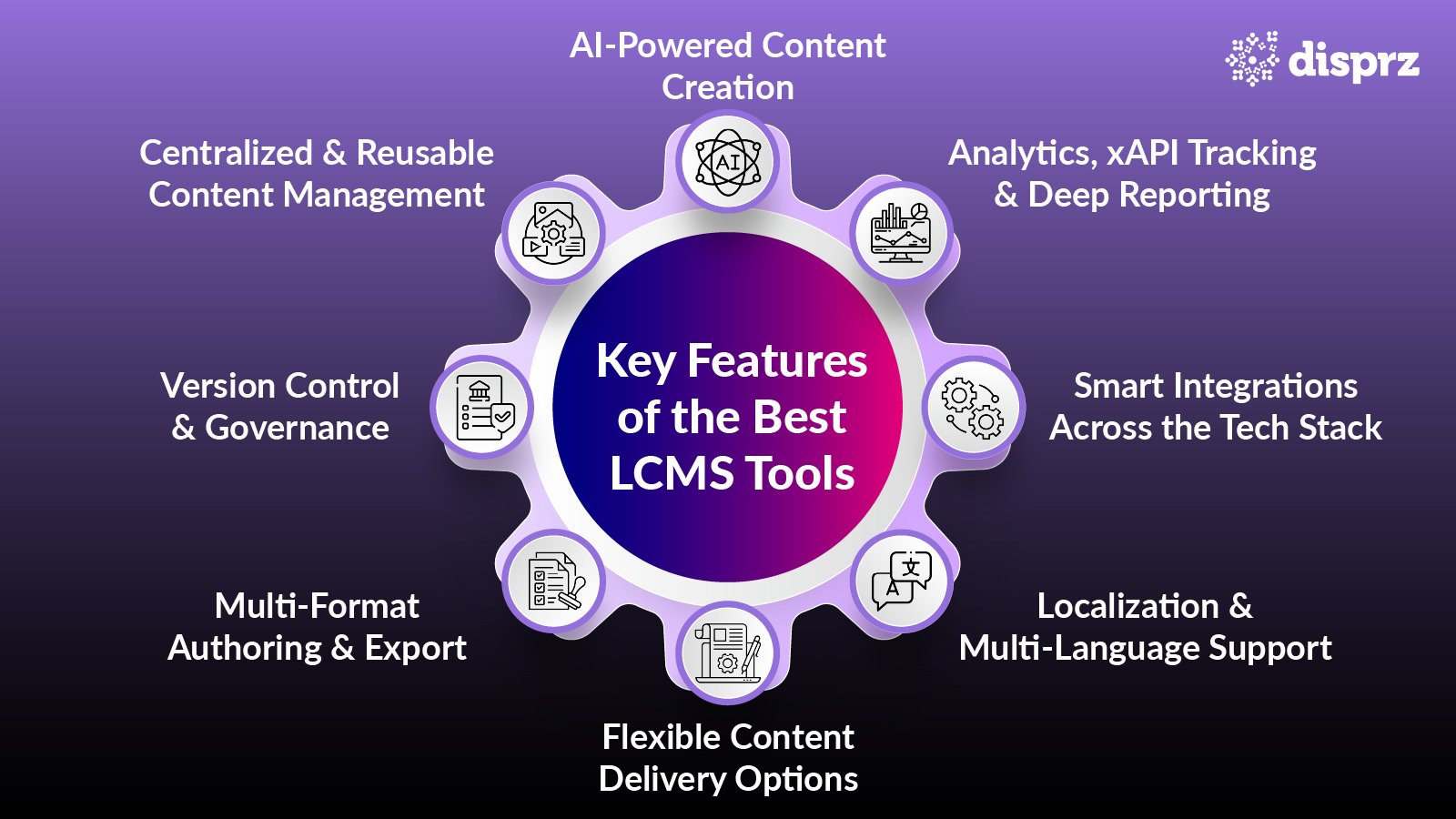
1) AI-Powered Content Creation
AI has become a quiet accelerator in modern LCMS platforms. It can draft lessons, assessments, case scenarios, and microlearning modules in minutes; something that once took days. This helps instructional designers shift from manual creation to strategic refinement. Some systems, including Disprz, weave AI directly into the authoring workflow so teams can turn rough ideas into structured first drafts without losing time.
2) Centralized & Reusable Content Management
Learning teams often work across scattered drives, folders, and LMS uploads. A strong LCMS brings every asset, such as videos, slide decks, simulations, documents, and templates, into one place. Once everything lives in a central library, reuse becomes effortless. Teams can pick up an existing scenario, tweak a video, or repurpose a slide into a micro-module, ensuring nothing gets recreated from scratch and knowledge stays consistent across programs.
3) Version Control & Governance
When multiple authors, reviewers, and SMEs collaborate, version chaos is inevitable. The best LCMS tools address this by maintaining detailed version histories, locking approved versions, and routing updates through clear approval paths. This governance layer prevents accidental overrides and ensures compliance-heavy content, like safety or financial training, remains accurate and audit-ready.
4) Multi-Format Authoring & Export
Learners now consume training everywhere: on mobile apps during commutes, on browsers at work, through LMS portals, and even offline in frontline environments. Because of this, content must travel across formats easily. Strong LCMS platforms support SCORM, xAPI, HTML5, and modular microlearning outputs. Many also offer simple export or one-click publishing workflows, helping L&D teams avoid the tedious work of recreating each module for different channels.
5) Flexible Content Delivery Options
Training today isn’t limited to one mode. Organizations blend on-demand modules with live sessions, hybrid onboarding, peer-led training, and customer education. The best LCMS platforms support this mix, allowing one piece of content to serve different audiences, enhancing employee engagement. Disprz is one example of a system that enables this flexibility, so content can reach employees, partners, or customers in whatever format suits the journey.
6) Localization & Multi-Language Support
As companies serve global teams, content must adapt to language, tone, and cultural expectations. Leading LCMS tools now include AI-driven translation, region-specific formatting, and multi-language versioning. This helps teams maintain one source of truth while ensuring every learner receives content that feels familiar, not foreign.
7) Smart Integrations Across the Tech Stack
An LCMS becomes far more valuable when it connects the dots across an organization. HRMS integrations sync employee data; CRM connections bring sales roles and performance insights into view; SSO keeps access simple. Many platforms, including Disprz, offer pre-built connectors so content, enrollment, and analytics flow into existing workflows without manual intervention.
8) Analytics, xAPI Tracking & Deep Reporting
Content is only useful when teams know how it performs. Modern LCMS tools go beyond basic completion reports by tracking interaction-level data around how long learners spend on a page, where they drop off, which assets they replay, and how performance changes after training. With xAPI and detailed analytics, L&D can identify which content works, where learners struggle, and how training links back to business outcomes.

Best LCMS Tools in 2026
The LCMS market has matured quickly in the last couple of years. What started as simple authoring utilities has grown into fully capable systems that manage the entire content lifecycle, from creation and reuse to distribution and analytics. As organizations shift toward modular learning, AI-assisted authoring, and multi-format delivery, a handful of platforms stand out for doing this well at scale.
Below is a balanced look at the LCMS tools shaping 2026, starting with the platforms that offer the most complete, future-ready feature sets.
1) Disprz
Disprz brings together strong LCMS capabilities with the flexibility enterprises need to manage learning across roles and regions. It supports modular content creation, reusable learning objects, version control, and multi-format delivery, making it a reliable foundation for organizations that want to scale structured and continuous learning.
2) Xyleme
Xyleme is known for its component-based content approach, allowing teams to break learning into reusable blocks and publish to multiple channels. It excels when organizations need responsive, adaptive content that stays consistent regardless of where learners access it.
3) Elucidat
Elucidat focuses on rapid, intuitive authoring for teams that need clean, interactive courses without technical complexity. Its template-driven design makes it a strong choice for high-volume content creation.
4) Adobe Captivate Prime
Though positioned as an LMS, Captivate Prime offers LCMS-like strengths such as authoring, versioning, multi-format exports, and structured content reuse. It works well for organizations that prefer a combined authoring-and-delivery solution.
5) LearnUpon
LearnUpon blends core LMS features with lightweight content creation. Teams that want basic authoring alongside traditional learning management often choose this hybrid approach.
6) Coassemble
Coassemble offers a simple, visual way to build and update training modules. It’s well-suited for SMBs or lean L&D teams building onboarding or compliance content quickly.
Here’s a brief comparison of the tools
| LCMS Tool | Best For | Key Features | Deployment |
|---|---|---|---|
| Disprz | Enterprise learning at scale | Modular authoring, reusable assets, governance, multi-format delivery | Cloud / SaaS |
| Xyleme | Adaptive, multi-channel content | Component authoring, responsive design, and reuse workflows | Cloud |
| Elucidat | Rapid course creation | Web authoring, templates, interactive modules | SaaS / Cloud |
| Adobe Captivate Prime | Authoring and delivery combined | Multi-format export, SCORM/HTML5, structured reuse | Cloud |
| LearnUpon | Hybrid LMS–LCMS use cases | Built-in authoring and LMS features | Cloud / SaaS |
| Coassemble | Quick, template-led training | Layout templates, simple workflows, interactive content | Cloud / Web |
Real-World Examples & Use Cases for LCMS
Example 1
Take Xyleme, for instance, a well-known LCMS with robust capabilities for creating, organizing, and distributing various types of learning content, including eLearning, HTML, tests, and quizzes.
Example 2
Sprout Social serves as a prime example of LCMS efficacy. Transitioning to remote work exposed limitations in their previous Learning Management System, prompting a switch to Disprz. With Disprz, they crafted dynamic training modules featuring interactive elements like audio and video, fostering collaboration among the L&D team. This shift led to high learner satisfaction, streamlined scheduling, and improved course completion rates.
Common LCMS Use Cases
1) Compliance & Regulatory Training
LCMS platforms help teams build consistent, audit-ready modules for safety, data protection, financial compliance, and industry-specific regulations. Updates roll out instantly, reducing risk in fast-changing environments.
2) Role-Based Onboarding
Different roles require different learning paths. LCMS systems make it easy to assemble modular content into tailored journeys for sales reps, engineers, customer success teams, or frontline staff.
3) SOP & Process Learning
Standard operating procedures change often. An LCMS allows teams to update one source of truth and push the latest version across all manuals, microlearning cards, and job aids without duplication.
4) Customer Education & Enablement
Companies use LCMS tools to build help centers, product walk-throughs, and training modules that guide customers through onboarding and advanced product usage, driving adoption and reducing support tickets.
5) Product & Skills Training
When product features update weekly, content needs to move just as fast. LCMS platforms enable quick edits, reusable components, and multi-format exports so training stays aligned with product changes.
LCMS Vendors: What to Consider Before You Buy
Choosing an LCMS is less about the feature list and more about how well the vendor fits your workflow, scale, and content strategy. Most leading platforms, including Disprz, Xyleme, Elucidat, and others, offer strong authoring tools, collaboration features, version control, and analytics. The differences usually show up in deployment flexibility, integration strength, pricing tiers, and how easily the system adapts to your use cases.
A good vendor should help your team move faster, support multi-format delivery, and provide the governance needed for long-term content maintenance. The table below gives a quick snapshot to guide your evaluation.
LCMS Vendor Comparison (High-Level Buying Guide)
| Tool Name | Deployment Options | Strengths | Ideal Audience |
|---|---|---|---|
| Disprz | Cloud / SaaS | Modular authoring, reusable assets, analytics, strong multi-audience delivery | Mid-large enterprises scaling learning across roles & regions |
| Xyleme | Cloud | Component content management, strong reuse, adaptive multi-channel publishing | Enterprises with complex, global content ecosystems |
| Elucidat | SaaS | Rapid authoring, intuitive UI, scalable content templates | L&D teams needing fast, high-volume course creation |
| Adobe Captivate Prime | Cloud | Authoring and delivery, SCORM/HTML5 export, structured reuse | Organizations wanting LMS and LCMS capabilities together |
| LearnUpon | Cloud | Hybrid LMS–LCMS, simple authoring, clean user experience | Mid-sized teams needing basic content creation & LMS functionality |
| Coassemble | Cloud / Web | Template-based authoring, easy setup, interactive modules | SMBs, startups & lean L&D teams |
| Thrive | Cloud | Modern UX, user-generated learning, quick content creation | Companies focused on social learning & lightweight authoring |
How to Choose the Right LCMS (2026 Checklist)
Use this checklist to evaluate whether an LCMS fits your organization’s learning model, scale, and long-term content strategy.
Embrace Predominantly Digital Learning
Choose an LCMS that can manage, deliver, and track rich digital content at scale. It should keep material consistent across devices and geographies, especially if your workforce is hybrid or distributed.
Produce Digital Learning Content Internally
If your team creates content in-house, prioritize strong authoring tools, such as templates, media support, modular blocks, and easy updating, so the content stays relevant without heavy development cycles.
Prefer Integrated Creation and Delivery
Pick a platform that brings authoring and delivery into one workflow. This reduces tool fragmentation, lowers costs, and ensures learners always see the latest version of your content.
Streamline Content Authoring Processes
Look for intuitive interfaces, reusable templates, and built-in collaboration. When teams can co-create smoothly, they spend less time on mechanics and more on instructional quality.
Leverage Deep Learner Analytics
A modern LCMS should provide clear insights into engagement, progress, and performance. Detailed dashboards help L&D improve content, personalize programs, and prove business impact.
Explore Advanced Tracking with xAPI
If you want visibility into informal, experiential, or multi-touch learning journeys, choose an LCMS that supports xAPI for richer data beyond SCORM.
Ensure Secure Access & Compliance
Your LCMS should offer encryption, role-based permissions, SSO, and compliance safeguards to protect sensitive content and learner data.
Decision Framework: What to Choose Based on Your Needs
-
If you create large volumes of content → choose an LCMS with strong authoring, templates, and reusable learning objects.
-
If your workforce is global → prioritize multilingual support, localization tools, and regional deployment flexibility.
-
If your learners consume content everywhere → pick a platform with multi-format export (SCORM, xAPI, HTML5) and mobile-first delivery.
-
If you need a single tool for end-to-end delivery → go for platforms that combine creation and distribution seamlessly.
-
If governance and compliance matter → select a vendor with version control, audit trails, and structured approvals.
-
If analytics drives your strategy → look for xAPI, deep dashboards, and integration with business systems.
Advanced LCMS Capabilities (2026 and Beyond)
As digital learning becomes more dynamic and business-aligned, LCMS platforms are evolving far beyond basic authoring and storage. The most capable systems now support intelligent content creation, adaptive delivery, and integrated governance, helping L&D teams operate with the speed and precision the business expects.
AI-Assisted Content Authoring
AI now acts as an embedded collaborator in the authoring process. It drafts modules, rewrites text for clarity, suggests assessments, and converts long documents into microlearning, allowing teams to move from outline to working prototype in minutes instead of days.
Adaptive Learning Experiences
Modern LCMS platforms adjust difficulty, content sequence, and practice activities based on learner behavior. Instead of everyone moving through the same track, the system nudges each person toward the next best piece of content.
Personalized Content Pathways
Personalization goes beyond role-based access. LCMS tools now build pathways based on skill level, performance data, manager priorities, and even workflow tools, ensuring learners see content that actually matters to their day-to-day work.
Multilingual Authoring at Scale
Global organizations need content that feels local. Advanced LCMS solutions offer AI-led translation, side-by-side editing, cultural adaptation, and multi-language versioning, turning one master file into dozens of localized experiences with minimal effort.
Compliance Automation & Audit Readiness
Regulated industries rely on LCMS platforms that can automate version checks, ensure every update goes through the right approval chain, and maintain audit trails. When a policy or SOP changes, the LCMS updates every dependent module instantly.
Version Control and Branching Scenarios
Large teams often run multiple variations of the same module. Modern LCMS tools support branching versions for different regions, customers, or job roles, while maintaining a single source of truth. This helps avoid duplication and keeps updates synchronized.
Deep Integrations Across the HCM / CRM / Support Stack
The LCMS is no longer a standalone system. Today’s platforms plug into HRMS, CRM, support tools, and collaboration apps, so learning mirrors the reality of work. Integrations allow user data, skills data, and workflow signals to flow directly into content creation, personalization, and reporting.
LCMS for Enterprise L&D vs SME L&D
Enterprises and SMEs approach LCMS adoption from very different realities. Enterprises look for structure, scale, and integration depth, while SMEs prioritize speed, simplicity, and ease of ownership. A strong LCMS should be able to meet both ends of this spectrum.
For Enterprise L&D Teams, an LCMS Must
-
Handle large-scale content operations across multiple business units, roles, and geographies.
-
Support rigorous governance, including version control, approvals, and audit records.
-
Integrate deeply with HRMS, CRM, SSO, and workflow tools to fit into enterprise ecosystems.
-
Enable multi-language authoring and global localization at scale.
-
Push updates instantly so changes cascade across all dependent learning paths.
-
Offer strong compliance readiness with controlled access and security layers.
-
Function as a strategic content infrastructure for long-term L&D maturity.
For SME L&D Teams, an LCMS Should
-
Be easy to deploy, with minimal setup and low administrative overhead.
-
Provide fast authoring through templates, drag-and-drop tools, and AI assistance.
-
Keep everything within a simple, unified workspace without complex workflows.
-
Require light governance, suitable for smaller teams and fewer reviewers.
-
Reduce reliance on external vendors by enabling quick in-house updates.
-
Fit within budget-friendly pricing and lightweight IT environments.
-
Support straightforward programs like onboarding, compliance, SOP, and product training.
Where the Needs Overlap
-
Both require reusable content blocks to avoid duplication.
-
Both value AI-driven creation and multi-format publishing for faster delivery.
-
Both depend on analytics to track engagement, performance, and content quality.
-
Both count on the LCMS to maintain a single source of truth for learning materials.
How Disprz Supports LCMS and LXP Use Cases
Central Content Hub
Disprz offers a unified library where every asset (videos, documents, assessments, micro-modules) lives in one place. Teams can organize, update, and reuse content without juggling folders or losing track of versions, creating a single source of truth for all learning materials.
AI-Assisted Authoring
Integrated AI helps teams move quickly from idea to draft by generating lesson structures, summaries, assessments, and microlearning variations. It reduces time spent on first drafts and allows L&D teams to focus on refining and improving content quality.
Mobile-First Microlearning Creation
Disprz makes it easy to build lightweight, mobile-ready modules designed for frontline, hybrid, and distributed teams. Content is formatted to load quickly, support interactive components, and fit into the flow of work.
Multi-Channel Publishing
Content created in Disprz can be published instantly across LMS systems, internal learning microsites, partner or customer portals, and mobile apps. This allows the same module to reach employees, partners, and clients without rebuilding it for each platform.
Role-Based Learning Pathways
L&D teams can assemble personalized learning pathways based on job role, level, skill requirements, or business priorities. Learners see content that matches their work context, improving relevance and adoption across the organization.
Built-In Learning Analytics
Engagement data, completion rates, skill progress, and content performance are captured in real time. Leaders get clear visibility into what’s working, where learners are struggling, and which programs drive meaningful change.
xAPI Support for Deep Tracking
Beyond basic completions, Disprz captures detailed behavior related to interactions, clicks, time spent, and choices made through xAPI reports. This gives L&D sharper insight into learner behavior and content effectiveness.
Multi-Language Authoring and Localization
Disprz supports multi-language learning by allowing teams to manage different language versions of the same module from a single content hub. Instead of recreating courses for every region, authors can translate and localize content while keeping structure and updates aligned.
If you’re planning your next phase of digital learning, schedule a demo today with Disprz — a practical way to bring LCMS and LXP capabilities together.
Key Takeaways
-
A modern LCMS streamlines how learning content is created, managed, updated, and delivered, reducing friction across the entire L&D lifecycle.
-
AI, modular authoring, multi-format publishing, and analytics now make LCMS platforms essential for organizations that want speed, consistency, and business alignment.
-
Enterprises need scale, governance, and integration depth; SMEs need simplicity and fast creation; the right LCMS can support both.
-
Disprz fits this new LCMS landscape by bringing together intelligent authoring, reusable content, flexible delivery, and analytics that help L&D teams operate with more clarity and momentum.
Conclusion
Learning teams are stepping into a new rhythm. Content needs to move faster, stay accurate longer, and adapt to the way people actually work. An LCMS brings that discipline to a single place, where creation, updates, and delivery stay tightly connected rather than scattered across tools and teams, especially when paired with modern LMS platforms that scale learning impact.
As organizations deepen their digital operations, this kind of foundation becomes less optional and more of an operating requirement. The leaders who invest early in a modern LCMS will find themselves better equipped to scale skills, respond to change, and keep learning aligned with where the business is heading.
FAQs
1) What is an LCMS?
An LCMS is a platform that helps L&D teams create, organize, update, and publish learning content from one place. It centralizes assets, supports reusable components, and ensures changes flow consistently across all learning programs. Modern LCMS tools also bring AI-assisted authoring, multi-format export, and analytics so teams can produce and maintain content at the speed the business needs.
2) What is the difference between an LCMS and an LMS?
An LCMS is built for content creation and management, such as authoring, version control, reuse, and publishing. An LMS is built for delivery and administration; such as enrollments, tracking, compliance, and reporting. Most organizations use both; the LCMS to build and manage content, and the LMS to deliver it to learners at scale. Some platforms blend both capabilities, but their core purposes remain distinct.
3) What are the benefits of an LCMS?
An LCMS reduces production time, prevents version chaos, and keeps learning materials consistent across roles and regions. It helps teams reuse content, collaborate better, and publish updates instantly across channels. With AI, analytics, and multi-format export, an LCMS creates a smoother, faster, and more scalable way to build learning programs without relying on multiple disconnected tools.
4) What is the best LCMS for 2026?
The best LCMS depends on your scale, industry, and workflow. Enterprise teams often choose platforms like Disprz or Xyleme for their governance, multi-format publishing, and integration depth. Smaller teams may prefer tools like Elucidat or Coassemble for quick authoring and simplicity. The right choice is the one that fits your content volume, collaboration needs, and long-term learning strategy.
5) Which industries use LCMS software?
LCMS platforms are common in industries with frequent updates, compliance requirements, or large distributed workforces. This includes BFSI, retail, manufacturing, logistics, healthcare, tech, pharma, and professional services. Companies use LCMS systems to keep content accurate, manage versions across regions, and deliver consistent training at scale.
6) Does Disprz work as an LCMS & LXP combined?
Yes. Disprz brings LCMS-style authoring, asset management, and version control into the same ecosystem where learning is delivered, tracked, and personalized. This gives L&D teams a single environment to create content, assign it to different audiences, measure impact, and continually improve the learning experience without juggling multiple tools.
7) Can an LCMS create SCORM/xAPI courses?
Most modern LCMS platforms support SCORM, xAPI, and HTML5 exports, making it easy to deliver content through LMS, LXP, or mobile applications. xAPI support also unlocks deeper behavioral insights, helping teams understand how learners interact with content and where improvements are needed.